



New players on Roobet can start exploring many features immediately, but full access requires completing account verification. While the verification process is usually quick, it may seem unfamiliar to first-time users. Verifying your account is an important step to unlock all features and fully enjoy the Roobet Bitcoin casino experience, including deposits, withdrawals, and gameplay options.
Reasons why you should verify your identity at Roobet
Verification for your account helps protect it from unauthorised access and suspicious activities. More importantly, it also lessens friction with payment processors.
When your account is verified, the relevant authorities, like Roobet’s license provider and payment partners, will know that your transactions are not suspicious. It keeps you safe from fraud and scams, while also protecting the casino from bonus abuse by bad users.
Another benefit of completing the verification process is gaining full access to Roobet’s bitcoin casino features. Each verification level unlocks certain conveniences and privileges, like faster validation or bigger cash bonuses to claim. Finishing the process all the way to level 4 lets you enjoy Roobet’s platform to the fullest.
Brief guide per verification level
To get to the verification page, follow these steps:
- Log in at Roobet
- Click the hexagon shape at the upper right corner of the screen
- Select ‘Account Settings’
- Switch to the Verification Tab
The process is quick and straightforward, and this overview highlights what to expect and what steps to take when needed. Below is a clear guide to every Roobet account verification level. Here is a complete guide to every Roobet account verification level:
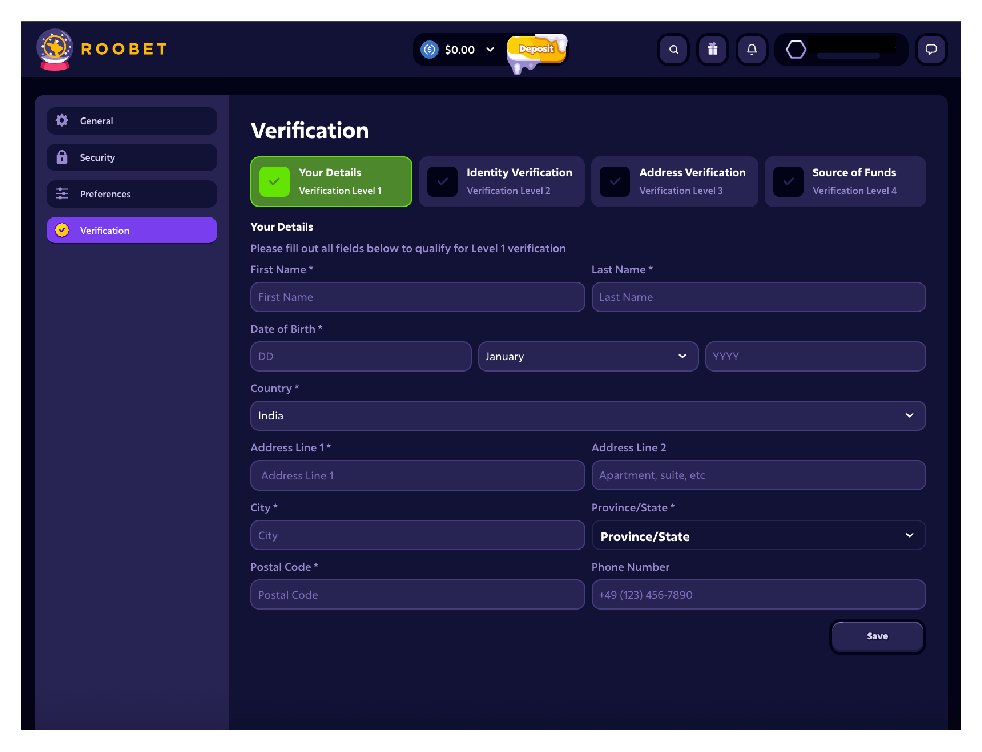
Level 1: Your details
To reach this section, click on the tab named ‘Your Details’. This is where you will input basic information about yourself. It will ask for your legal name, birthdate, country, and mailing address. All items with asterisks (*) are required, and you cannot move forward until those are filled. Items without the mark are optional, and can be skipped if you wish.
Remember that this is part of the Know Your Customer (KYC) requirements for most payment providers. It will help with processing your payments, allowing you to deposit and withdraw funds quickly. Click the save button on the lower right to complete verification level 1.
If you made an error or would like to update your details, just come back and make those changes. Clicking the save button will overwrite the previous data and keep the changes you’ve made.
Level 2: Identity verification
You can complete the identity verification process by following these steps:
- Take a picture of a valid document
- Upload the document to Roobet via the ‘Click to Upload or drag and drop’ box
- Click ‘Save’
The document needs to be saved in PNG, JPG, or PDF file formats. Otherwise, the website cannot accept it under ‘file type not supported’. Roobet also has a file size limit of 5 MB, so lessen the resolution if it’s too big or take another photo, but with low pixel settings.
Roobet only accepts documents like government-issued ID that are still active. Expired IDs won’t be accepted. The following documents have a high likelihood of being accepted:
- Driver’s license
- Passport
- Aadhaar card
- PAN card
- Ration card
- Birth certificate
- Service ID
The ID picture provided should include your basic information, like legal name, birthdate, country, and mailing address. If any of these details are unreadable, Roobet will ask you to try again.
Level 3: Address verification
Address verification will be done by following these steps:
- Take a picture or scan of a supported document
- Upload the document to Roobet
- Click ‘Save’
This verification level still only accepts PNG, JPG, or PDF in less than 5 MB storage size. Accepted documents usually include bills or bank statements issued in the last 6 months. Try the following types of documents for address verification:
- Lease agreement
- Electricity bill
- Water bill
- Loan equated monthly instalment (EMI)
- Banking statements
- Credit card statement of accounts
The document needs to have a legible view of your name and mailing address. If it’s illegible, Roobet will request another attempt.
Level 4: Source of funds
Verification for the source of funds follows these steps:
- Take a picture or scan the document you wish to submit
- Upload the file to Roobet
- Click ‘Save’
Likewise, the file needs to be in PNG, JPG, or PDF and is no more than 5 MB. Documents supported for this verification level need to be proof of your source of income. The following have a high chance of being accepted:
- Payslip
- Service agreement
- Board minutes for dividends
- Financial statement
The submitted file should contain your full name, the employer’s details, the relevant value, and the date of payment. Roobet may ask for a new copy if the file is illegible or incomplete.
Key notes to improve verification success
Roobet and payment providers take KYC seriously, so they may reject your verification for a variety of reasons. To ensure that you succeed, remember these tips:
- Make a deposit first — A successful deposit links your Roobet account with a wallet or bank account. This serves as an indicator that you are a real user, not a bot account or a bonus abuser.
- Don’t use VPNs — Your address is one of the most important details being verified. Using a VPN could create inconsistencies between your submitted files and your current location. This can be flagged as suspicious activity or misinformation.
- Prepare your documents’ latest versions — Whether it’s an ID, a statement of account, or a bill, it needs to be the latest version. It’s easier to validate, which means you are more likely to have it approved than rejected.
Roobet’s verification system is quick and easy, albeit with a few clarifications needed to help smooth your experience. Just keep these in mind to avoid issues, and you should be done in no time. You will be notified via email that your documents are approved. Once done, you may now enjoy all the fun benefits at Roobet, one of the top crypto casino sites.
